




You’ve spent hours perfecting your brand identity. The logo feels right, the typography sings, and the color palette? Chef’s kiss. Then the printed cards arrive — and something’s wrong. The colors look muddy, the bleed is off, and that elegant white text has practically disappeared into the background.
Sound familiar? This is exactly why smart designers never skip the mockup stage.
Why Mockups Are Non-Negotiable in Modern Design Workflow
A Business card mockup isn’t just a pretty presentation trick. It’s your last line of defense before ink hits paper — and paper hits the trash bin.
When you visualize a card in a realistic, three-dimensional environment, your brain processes it differently than it does a flat Illustrator file on a white artboard. Suddenly you notice that the logo sits too close to the edge. The font that looked bold on screen reads as thin and fragile in context. The “clean” layout actually feels empty when you hold it in your hand — even virtually.
Mockups compress the feedback loop. Instead of waiting for a print proof (which can cost time, money, and your client’s trust), you’re catching issues in minutes.
The Most Expensive Mistakes Designers Make Without Mockups
Let’s get specific. Here are the production errors that mockups help you catch before they become costly regrets:
- Bleed and safe zone violations — Elements too close to the trim line often get cut. A mockup in realistic context makes this visually obvious in a way flat files simply don’t.
- Color mode mismatches — RGB looks stunning on screen; CMYK prints differently. A good mockup workflow forces you to think in print terms from the start.
- Contrast and legibility failures — Small text on a dark card background can look readable on screen but completely disappear in the physical world.
- Scale miscalculations — That elaborate illustration might look refined at full screen. At 3.5 × 2 inches? It becomes visual noise.
Each of these mistakes, if caught at the print stage, can cost hundreds — sometimes thousands — in reprints, rush shipping, and damaged client relationships.
Real-World Use: How Professionals Actually Use Business Card Mockups
Theory is one thing. Let’s talk practice.
The Freelance Brand Designer presents three concepts to a client during discovery. Instead of flat exports, she drops each design into a lifestyle mockup — cards resting on a marble desk beside a coffee cup. The client immediately gravitates toward option two, not because it’s objectively better, but because it feels right in context. The mockup sold the vision.
The Print Shop Owner uses mockups as a pre-press communication tool. When clients submit designs with incorrect margins, he renders a mockup showing exactly where the cut will fall. The visual evidence eliminates argument. Revisions happen faster, production moves smoother.
The Startup Founder bootstrapping his own brand uses free mockup scenes to test three different paper finish concepts — matte, gloss, and soft-touch — without ordering physical samples. He makes a confident decision, saves on sampling costs, and orders with certainty.
The Creative Agency includes mockup presentations as a standard deliverable in every branding package. It adds perceived value, reduces revision cycles, and makes approval sign-offs faster. Clients feel confident. The agency looks polished.
Business Card Mockups on ls.graphics
For designers who take quality seriously, ls.graphics offers a remarkable library of business card mockups worth exploring.
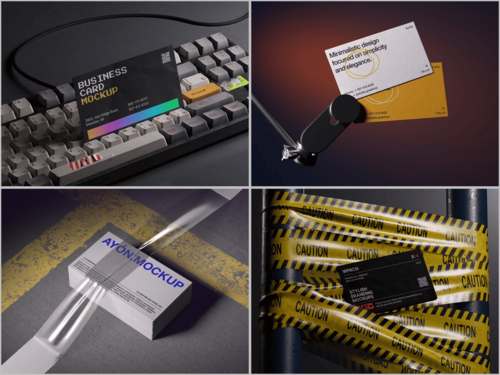
What sets them apart is the combination of ultra-realistic rendering and thoughtful organization. Each mockup features clearly organized layers, making customization genuinely fast rather than frustrating. You get multiple angles and perspectives — flat lay, hand-held, stacked, scattered — giving clients a complete spatial understanding of the design. Various color styles and stylish minimalistic compositions ensure the mockup enhances rather than competes with your work. There’s also an Edit Online feature for quick browser-based customization, and a generous selection of free scenes to explore before committing. Premium quality, zero guesswork.
Building a Smarter Pre-Print Checklist
Before sending any business card to production, run through these essentials:
- Confirm document dimensions: standard is 3.5″ × 2″ with 0.125″ bleed on all sides
- Convert all colors to CMYK and check values against your printer’s profile
- Embed all fonts or convert to outlines
- Verify image resolution is 300 DPI minimum
- Test the design in a realistic mockup at actual scale
That last point ties everything together. Mockups aren’t decoration — they’re a diagnostic tool.
Conclusion
Great print design isn’t just about creativity. It’s about precision, foresight, and process. A business card mockup gives you the power to see your design as it will truly exist — before a single card rolls off the press.
Whether you’re a solo freelancer or a full-service agency, integrating mockups into your pre-print workflow is one of the highest-leverage habits you can build. And when you need a resource that matches your standards, the library at ls.graphics is a genuinely strong place to start.
Print with confidence. Mockup first.